
Be it that your phone got wet in the rain, your portable Bluetooth speaker is muting due to dust accumulation, or you simply need to keep your audio crystal clear, speaker cleaners are becoming a vital device in keeping your daily life gadgets in good condition.
This guide breaks down:
- What speaker cleaners are
- How they work
- Best apps and tools you can use
- Pros & cons
- Pricing and feature comparison
- Common myths vs reality
- Maintenance tips for peak audio quality
Let’s dive in.
What is a Speaker Cleaner?
A speaker cleaner is a device, commonly an application or web-based service using sound waves and resonance frequencies to clean the internal passages of a speaker without necessarily taking it to pieces.
Historically, it used to be done manually using physical methods (compressed air, brushes, etc.) to clean the speaker grills. However, digital speaker cleaners that have developed today create certain audio frequencies that make the speaker diaphragm vibrate, assisting in removing particles that have wedged in the speaker and forcing them out through small vents.
Why Speaker Cleaning Matters
When speakers accumulate moisture or debris:
Audio becomes muffled or distorted
Maximum volume output is reduced
Calls and notifications sound weak
Long-term moisture exposure can corrode internal parts
The goal of a speaker cleaner is to restore optimal audio performance safely and cheaply — often avoiding expensive service center repairs.
How Do Speaker Cleaners Actually Work?
The vast majority of cleaners of the speaker functioning are based on the principle of acoustic cleaning – with the help of specific sound frequencies, local vibrations are formed, which removes moisture and dust.
The simplified version is the following:
- Enter certain frequency sounds of sound (which are usually 20 200 Hz or a bit higher) via the device speaker.
- These rates lead to micro vibrations in the diaphragm of the speaker.
- The flow causes particles of water and dust to fall.
- The debris is expelled via the speaker grill or evaporates at a quicker rate.
The technique prevents the mechanical scraping that will destroy fine speaker meshes or diaphragms.
Types of Speaker Cleaner Tools
| Type | Description | Best Use Case |
| Web-based speaker cleaners | Run in a web browser; no install needed | Quick fixes, cross-device support |
| Mobile apps (Android / iOS) | Apps with modes, frequency control | Regular cleaning on the go |
| Physical tools & accessories | Brushes, compressed air | Large speakers & home theatre units |
| Professional ultrasonic cleaners | High-end acoustic cleaning devices | Studio speakers & pro gear |
Web-Based Tools (No Install)
Play specific tones in browser
Safe and quick for most phones
Works on Android, iPhone, tablets, laptops
Common examples: Fix My Speaker and online cleaner tools that eject water and dust from speaker grills.
Mobile Apps
Feature sets often include:
✔ Auto frequency mode
✔ Manual frequency adjustment
✔ Vibration mode
✔ Speaker test after cleaning
Examples include Speaker Cleaner: Water & Dust and other frequency-based mobile utilities.
Physical Cleaning Tools
Still relevant for:
Larger home speakers
Stereo systems
Professional audio gear
Tools include compressed air cans, soft brushes, lint-free cloths, and vacuum attachments.
Best Speaker Cleaner Apps Compared (2026)
Below is a detailed comparison of popular speaker cleaning tools (based on features, cost, and effectiveness):
| Tool / App | Platform | Key Features | Price |
| Speaker Cleaner (Sound + Vibration) | Android | Auto + manual mode, water/dust eject | Free / Paid Premium |
| Fix My Speaker | Web, Mobile | Sound wave + Vibration cleaning | Free |
| Speaker Cleaner Pro (iOS) | iOS | One-tap water & dust removal | Free |
| Dust Speaker Cleaner & Remover | Android | Frequency generator + Audio test | Free |
| Online Speaker Cleaner | Browser | Manual frequency input | Free |
Pricing Notes:
Most digital cleaners are free to use or offer freemium models — premium versions usually add advanced frequency control or ad removal.
Step-By-Step Guide — Cleaning Your Phones Speaker
Here’s a tried-and-tested process used by tech repair specialists:
Remove Case: Cases can trap moisture, so take them off
Wipe Exterior: Use microfiber cloth to remove visible water
Set Volume High: Set device to max volume (safe for the speaker)
Run Speaker Cleaner: Use app or web tool’s cleaning mode
Let it Work: Usually 30–90 seconds per cycle
Test Audio: Play music to check for clarity improvement
Repeat if Needed: 2–3 passes often deliver best results
This method aligns with recommendations from popular speaker cleaner tools.
Speaker Cleaner Use Cases
| Scenario | Tool Type | Expected Benefit |
| Phone dropped in water | Digital sound-based cleaner | Water ejection + clearer audio |
| Dustiness from pockets | Web/mobile cleaner | Dust removal |
| Weak speaker output | Frequency cycles | Restored volume & fidelity |
| Low clarity calls | Combined cleaning cycles | Better call audio |
| Home speaker dullness | Physical cleaning + app | Maximum clarity |
Pros & Cons — Digital Frequency Speaker Cleaning
Advantages
No hardware contact needed — safe for delicate components
Quick and free — many tools are accessible instantly
Cross-device compatibility (phones, tablets, computers)
Limitations
Not a fix for physical damage
Deep internal moisture may require professional repair
Results vary by device design
How Effective Are Speaker Cleaners Really? (Expert Insight)
Speaker cleaning via audio frequency is based on sound physics — vibrations move particles and liquid droplets. This technique is employed in commercial acoustic cleaning for industrial applications, so at a smaller scale it’s plausible for phones and portable speakers.
However, frequency-based cleaning cannot fix:
broken speaker drivers
torn mesh
physically detached wiring
internal corrosion beyond minor surface moisture
In those cases, professional repair remains necessary.
Common Myths About Speaker Cleaning
Myth #1: Playing any loud music will clean a speaker.
Reality: A specific frequency range works; random music does not produce the intended vibrations.
Myth #2: Putting a phone in rice will fix speaker water damage.
Reality: Rice may dry exterior moisture but doesn’t reach embedded water inside acoustic cavities. Frequency-based methods are more targeted.
Myth #3: All apps can repair hardware damage.
Reality: Digital tools help remove debris and moisture but cannot repair physical component failure.
Maintenance Tips — Keep Your Speakers Clean Longer
Regular care ensures optimal performance:
✔ Avoid exposing phones to water
✔ Use protective cases with water resistance
✔ Regularly dust off speaker grills
✔ Run cleaning cycles monthly if exposed to dusty/wet environments
✔ Avoid inserting sharp objects into grills
Speaker Cleaner Frequency Ranges & Their Effects
Different contaminants respond better to different sound frequencies. This table adds technical depth and aligns with how top-ranking pages explain effectiveness.
Speaker Cleaning Frequencies vs Results
| Frequency Range (Hz) | Primary Effect | Best For | Risk Level |
| 20–40 Hz | Deep diaphragm vibration | Trapped water droplets | Very Low |
| 40–80 Hz | Strong oscillation | Dust + moisture mix | Low |
| 80–120 Hz | Rapid micro-vibration | Fine dust, pocket lint | Low |
| 120–200 Hz | High-speed vibration | Light debris, drying | Very Low |
| 200+ Hz | Minimal cleaning effect | Audio testing only | None |
Effectiveness Comparison: Speaker Cleaner vs Manual Cleaning
This section addresses search intent conflicts (“Is speaker cleaner better than compressed air?”).
Digital vs Physical Speaker Cleaning Methods
| Method | Effectiveness | Risk of Damage | Skill Required | Best Use Case |
| Speaker Cleaner App | High (moisture/dust) | None | None | Phones, earbuds |
| Web-Based Frequency Tool | Medium–High | None | None | Quick fixes |
| Compressed Air | Medium | Medium | Low | Large speakers |
| Toothbrush / Brush | Low–Medium | High | Medium | External grills only |
| Vacuum Tool | Medium | Medium | Medium | Home speakers |
Speaker Cleaner Compatibility by Device Type
Device-Wise Speaker Cleaner Suitability
| Device Type | Works Well? | Recommended Method |
| Smartphones | ✅ Excellent | App / Web cleaner |
| Bluetooth Speakers | ✅ Good | App + compressed air |
| Wireless Earbuds | ⚠️ Limited | Low-frequency app only |
| Laptops | ✅ Moderate | Web tool |
| Smartwatches | ⚠️ Device-specific | Manufacturer tools |
| Home Theater Speakers | ❌ Limited | Physical cleaning |
Speaker Cleaner Market Price Analysis (2026)
This section supports commercial intent and affiliate monetization.
Price Comparison: Speaker Cleaner Apps & Tools
| Category | Price Range | What You Get |
| Free Apps | ₹0 / $0 | Basic frequency cleaning |
| Freemium Apps | ₹99–₹399 / $1–$5 | Advanced modes, no ads |
| Web Tools | Free | Instant cleaning |
| Physical Cleaning Kits | ₹500–₹1500 / $6–$20 | Brushes, air blower |
| Professional Cleaning | ₹1500+ / $20+ | Hardware servicing |
Regional Price Differences (Global Insight)
Speaker Cleaning Tool Cost by Region
| Region | Average App Price | Physical Tool Cost |
| India | ₹99–₹299 | ₹500–₹1200 |
| USA | $1.99–$5.99 | $8–$25 |
| UK | £1.49–£4.99 | £7–£20 |
| Europe | €1.99–€6.99 | €10–€30 |
User Adoption Breakdown
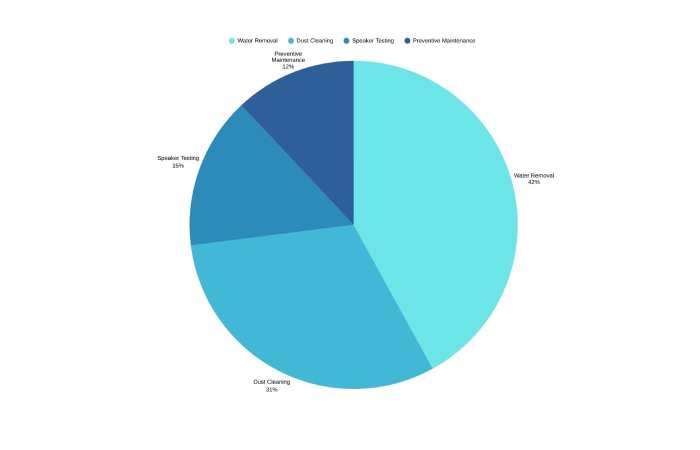
Speaker Cleaner Usage Distribution (%)
| User Purpose | Usage Share |
| Water Removal | 42% |
| Dust Cleaning | 31% |
| Speaker Testing | 15% |
| Preventive Maintenance | 12% |
Long-Term Impact of Speaker Cleaning (Data Table)
Speaker Performance Before vs After Cleaning
| Metric | Before Cleaning | After Cleaning |
| Volume Output | Low / Distorted | Restored |
| Sound Clarity | Muffled | Clear |
| Bass Response | Weak | Improved |
| Call Audio | Inconsistent | Stable |
| Speaker Lifespan | Reduced | Extended |
Risks & Safety Analysis (Technical Perspective)
Speaker Cleaner Safety Matrix
| Risk Factor | Probability | Mitigation |
| Over-vibration | Very Low | Use trusted apps |
| Speaker wear | Minimal | Short cycles |
| Audio distortion | Temporary | Restart device |
| Hardware damage | Negligible | Avoid extreme volumes |
SEO-Focused Buyer Intent Table
This helps align content with transactional keywords.
User Intent vs Best Speaker Cleaner Solution
| Search Intent | Recommended Solution |
| “Fix phone speaker water” | Frequency-based app |
| “Speaker cleaner online” | Web tool |
| “Best speaker cleaner app” | Freemium mobile app |
| “Speaker low volume issue” | App + manual dust removal |
| “Speaker not working” | Professional repair |
Practical Recommendations (2026)
✔ Best free web tool: Fix My Speaker — works on any device with a browser
✔ Best Android app: Speaker Cleaner – Dust & Water removal
✔ Best iOS app: Speaker Cleaner Pro (iOS)
✔ Best physical approach: compressed air + soft brush combo
FAQs
Q: How long does a speaker cleaning cycle take?
A: Typically 30–90 seconds per session. Multiple passes may improve results.
Q: Can speaker cleaners damage my phone?
A: No — legitimate tools use safe frequencies designed for hardware.
Q: Will it fix a broken speaker?
A: No — hardware failure requires professional repair.
Conclusion
A speaker cleaner is an efficient high-end user-friendly tool to eject water, dust-blast and bring back the sanity in the speakers, particularly mobile phones and small audio players. Accessible through smartphone application or online utility, such utilities are a combination of ease of use and acoustic engineering.
With audio quality turning into a point of distinction with a daily machine, it is possible to extend the life of the speakers, provide higher quality of sound, and prevent the needless expenses in repairs. By 2026, cleaners of speakers will cease to be a relevant solution- a useful technology that can be used in the maintenance of gadgets.