
 Afiya Jafar
Technology & Digital Trends Writer
Afiya Jafar is a technology writer with
5+ years of experience covering technology,
digital trends, artificial intelligence,
software, gadgets, cybersecurity and
emerging technologies.
View Author Profile →
 Sameena Begum
Technology & Digital Content Reviewer
Sameena Begum is a **technology and digital content reviewer** who reviews selected articles to help ensure that information is presented clearly, accurately, and responsibly.
View Reviewer Profile →
Selecting the most suitable printer subscription plan can really impact your printing costs. With HP Instant Ink Plans, you don’t need to replace cartridges each time your cartridge runs out. Instead, you pay for a page allocation every month or year, and HP automatically delivers new ink when you require it.
You might find that your household or business doesn’t need a subscription plan. The size of your printing order, how often you print, whether you print in colour and how many pages you print per month all affect whether the printer-on-demand plan makes financial sense.
What Is HP Instant Ink?
HP Instant Ink is a subscription printing service designed for use with eligible HP printers. By paying a monthly fee, subscribers receive ink – and no additional cost for printing – by selecting a plan based primarily on pages.
The printer keeps track of the ink levels and updates HP of the ink status via an internet connection. When it’s time to replace the ink, HP supplies new ink to your registered address.
Here is one significant difference: with ink subscriptions, pages are not measured by ink consumed. When a page has only a couple of lines of text, it is billed as the same as a full-colour page or photo.
This set up is great for households, students, the home office and small businesses who print on a regular basis.
Different Types of HP Instant Ink Plans
HP provides several subscription options to accommodate different printing habits. The exact plans and prices depend on the country and eligible printer.
Monthly Plans
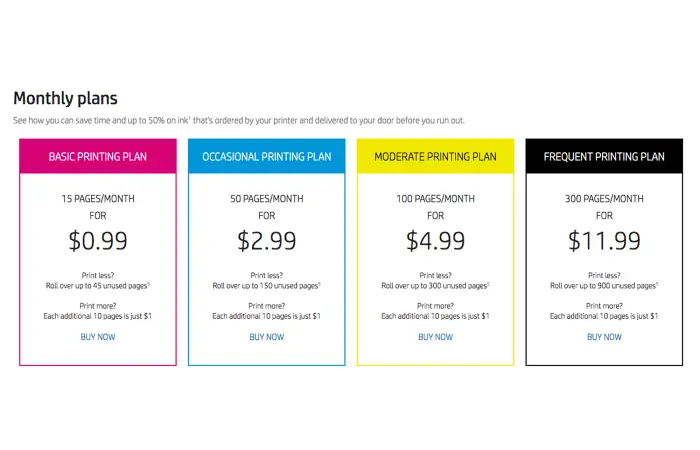
Monthly plans have a set amount of pages per billing period. They work well for users who like to see how much they will pay each month.
E.g. if you print in the region of 100 pages a month you might want to go for the 100 plan and not buy the cartridges as and when you need to.
Rollover pages may be carried over but are limited by plan. With applicable monthly ink plans, rollover page balance is capped at three times your monthly page allowance.
Yearly Plans
Annual subscriptions customers pay for their monthly allocated printing in advance.
These options may be less expensive than paying monthly. But they do involve a little more planning – and estimating how many pages you might want to print in the coming year.
Unused pages from a yearly ink subscription aren’t carried over into the next year (they are in a monthly ink subscription). There are also special cancellation and refund rules for a yearly ink subscription.
Pay As You Print Plans
Pay As You Print is suitable for people who don’t want a full monthly subscription.
Customers buy page sets and print pages as needed. Per HP’s plans information for US, the remaining purchased pages do not expire as long as the customer stays enrolled in the option.
This is the version for sporadic printing but it does not cost more than normal inkjets.
How HP Instant Ink Counts Pages
Understanding the page-counting system is essential because it directly affects your subscription expenses.
HP generally counts each printed side as one page. This means a double-sided document containing five sheets of paper counts as ten printed pages.
The following examples illustrate how the system works:
| Printing activity | Pages counted |
|---|---|
| One black-and-white document page | 1 |
| One full-colour photograph | 1 |
| Five double-sided sheets | 10 |
| Ten single-sided document pages | 10 |
If you exceed your monthly allowance and available rollover pages, HP may charge for additional page sets. The number of pages included in each set depends on your plan.
Customers who regularly exceed their allowance should consider upgrading rather than repeatedly paying additional charges.
Benefits and Limitations of HP Instant Ink
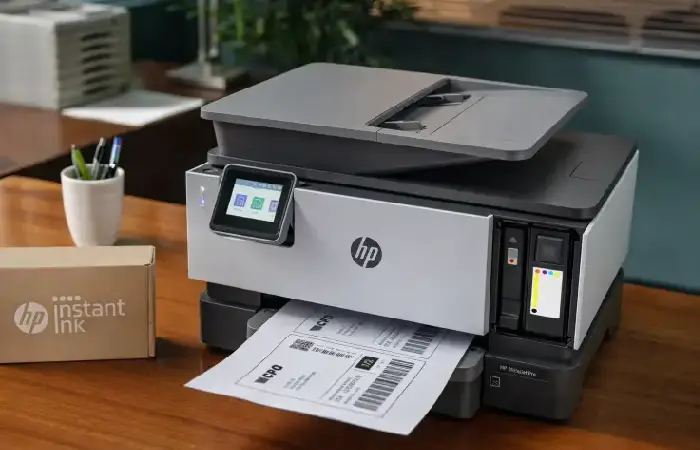
HP Instant Ink, but there are a few pitfalls as well.
Main benefits:
- Cartridge levels need not be tracked with automatic ink delivery.
- Receipt of payment makes it easier to predict printing costs.
- Eligible plans offer rollover pages.
- Monthly subscriptions provide flexibility to change plans.
- Available in areas served.
Potential disadvantages:
- An internet-connected, eligible HP printer is required.
- Customers must maintain a valid payment method.
- Colour photographs are deemed equivalent to normal documents in pages.
- Additional printing can increase monthly expenses.
- Instant Ink are linked to your account, the program, and printer.
It isn’t necessarily a lower-cost proposition for every user. Infrequent and low-volume print users may find that standard cartridges are more cost-effective.
How to Sign Up for HP Instant Ink
Enrollment is relatively straightforward, provided your printer supports the service.
Follow these steps:
- Visit the official HP Instant Ink website.
- Check whether your printer model is compatible.
- Create or sign in to your HP account.
- Select the subscription option that matches your printing requirements.
- Provide the required payment and delivery information.
- Follow the instructions to activate the service and install the supplied cartridges.
After enrollment, you can access your account dashboard to monitor page usage, review shipments and manage your subscription.
Cancel or Modify an HP Instant Ink Subscription
Occasionally printing needs change. The great news is that HP account members who are current on their subscriptions can change plans at any time.
To make a change to your plan, sign in, visit the page to manage your Instant Ink account, and click on manage plan. Choose your plan and see when the change will take effect.
Cancellations should be more cautious. The cancellation of the monthly plan applies after the billing period. Until the billing period is finished, the following are still available at Instant Ink.
You are unable to print if you have a cancelled Instant Ink cartridge. You will have to add regular cartridges that are compatible with your printer in order to do the printing.
Cancellation and refund rules vary for different subscriptions, so check the terms & conditions when signing up.
Frequent HP Instant Ink Issues and How to Fix Them
Printer is not receiving replacement ink: Make sure your printer has access to the internet, information, and delivery of ink. Make sure the account is active.
Other subscription charges: monthly page volume, overage page bundle and bill history.
Page capacity is too high: Check the page count on all colour prints, double-sided prints and photographs that are in progress.
You have no ink in your cartridges: Please check that your subscription is still in force. If you cancelled your subscription you can insert any normal cartridges after the end of your current billing period.
Check your account for plan options and see whether billing-cycle limits restrict the change.
For unresolved problems, you can get an account-specific support from HP’s official support.
Final Thoughts
HP Instant Ink Plans, you will never run out of ink as HP will automatically deliver ink as needed, so you will not need to buy ink cartridges for your printer. Monthly plans (different prices), as well as an Annual and Pay As You Print plans, can be purchased.
Your decision is founded on your real printing method. Just before you subscribe, establish how many pages you intend to print each individual month, verify your printer’s compatibility and go through and recognize your rollover and cancellation policies.
If you do a little research before you register you can find out which plan it is that you need to ensure you do not spend money on something you do not need and you can get the right printing plan.
AUTHOR
Afiya Jafar is a technology writer with 5+ years of experience covering artificial intelligence, software, applications, gadgets, cybersecurity, cloud computing, internet technologies and emerging technology trends.
AUTHOR PROFILE →
REVIEWER
Sameena Begum is a **technology and digital content reviewer** who reviews selected articles to help ensure that information is presented clearly, accurately, and responsibly.
REVIEWER PROFILE →