
 Afiya Jafar
Technology & Digital Trends Writer
Afiya Jafar is a technology writer with
5+ years of experience covering technology,
digital trends, artificial intelligence,
software, gadgets, cybersecurity and
emerging technologies.
View Author Profile →
 Sameena Begum
Technology & Digital Content Reviewer
Sameena Begum is a **technology and digital content reviewer** who reviews selected articles to help ensure that information is presented clearly, accurately, and responsibly.
View Reviewer Profile →
Steps to Cancel HP Instant Ink Online
The quickest method to cancel your HP Instant Ink account is to sign into your HP Instant Ink account.
- Go to the HP Instant Ink site: Launch the HP Instant Ink portal account on your browser.
- Sign in with the account you set up when you subscribe: Email: Password: Keep me signed in. How can I help?
- If you have more than one enrolled printer, select the correct device.
- In the navigation pane, choose HP Instant Ink, and then click Update Plan.
- Locate the cancel feature: Beneath the Plan Details heading.
- Follow the prompts and check the terms of cancellation.
- Confirm cancellation: Finish all confirmation pages until HP confirms your request.
HP explains, you will receive an immediate email confirmation of the cancellation. You will receive another confirmation email at the end of the billing period. Save both these emails as they serve as proof of your cancellation request.
What Happens After Cancelling HP Instant Ink?
Know what canceling means to your printer, ink cartridges, and charges before you cancel.
Your Subscription Continues Until the Billing Cycle Ends
It doesn’t usually mean the service is immediately paused or cancelled. Once you cancel, you can typically keep your service until the end of your billing period.
Instant Ink Cartridges Stop Working
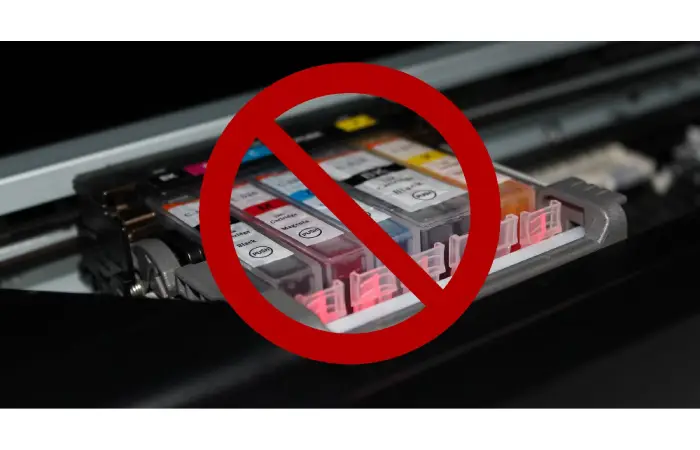
This is critical to keep in mind. All HP Instant Ink cartridges are linked to a subscription and are made to function as long as the device is enrolled in the service.
After the end of your subscription, the cartridges no longer work. You will need to take them out and replace them with normal HP ink cartridges that work.
You May Receive a Final Bill
HP is able to debit your account for the remainder of the billing period and any additional printing charges. The final charge may be billed at the end of the billing period.
You May Lose Unused Benefits
Promo months and rollover benefits may be lost if you cancel and reopen your plan. Please refer to your plan terms and conditions before cancelling.
Can You Cancel HP Instant Ink Without a Printer?
Yes. You usually do not require physical access to your HP printer to terminate the subscription.
Even if you no longer use the printer that has a subscription, you can view and manage it in your HP account that contains the enrolled printer.
This is what to do:
- Visit the HP Instant Ink account portal.
- Sign in using your registered email address.
- Select the enrolled printer from your account.
- Open the subscription management section.
- Locate the cancelling button and do the required.
- Save the confirmation email.
If you can not tell which printer is enrolled, view your printer details in your account. If you can not access your account, please contact HP Instant Ink support.
What If You Cannot Find the Cancel Instant Ink Option?
Sometimes, the cancellation option may not appear where you expect it. This can happen because of differences in account interfaces, multiple enrolled printers, or account-access issues.
- Check the selected printer: Make sure you are managing the correct enrolled device.
- Use the correct account: Sign in with the email address originally used to activate Instant Ink.
- Try another browser: Open the account portal using Chrome, Edge, or Safari.
- Check your subscription status: Review the Plan Details section to see whether your plan is active.
- Contact HP support: If the cancellation option remains unavailable, request assistance directly from HP.
Some older HP account interfaces use labels such as My Account, Account Settings, or Cancel My HP Instant Ink Subscription instead of Update Plan. Follow the cancellation instructions displayed in your particular account.
Should You Pause or Cancel HP Instant Ink?
If you are unsure about ending your subscription permanently, check whether your account offers a pause option.
| Feature | Pause Subscription | Cancel Subscription |
|---|---|---|
| Monthly subscription | Suspended during eligible pause | Ends after applicable billing period |
| Rejoining | Resume after the pause | May require re-enrollment |
| Ink cartridges | Subject to plan conditions | Stop working when subscription ends |
| Best for | Temporary reduction in printing | Switching away from Instant Ink |
HP offers eligible customers the option to pause their subscription for up to six months. Availability depends on the printer model and subscription conditions. Some plans are not eligible.
If you only print occasionally or are temporarily away, checking the pause option may be worthwhile. If you prefer buying your own cartridges, cancellation is likely the more appropriate choice.
Important Things to Do Before Cancelling
A little preparation can help prevent printing interruptions and unexpected charges.
- Check your next billing date.
- Review your recent invoices and additional printing charges.
- Save important subscription and payment records.
- Make sure you have compatible standard HP cartridges available.
- Confirm that HP has sent your cancellation confirmation.
- Check your account again after the billing cycle ends.
Do not remove the Instant Ink cartridges prematurely if you still intend to use them during your active subscription period.
Frequently Asked Questions
Is HP Instant Ink subject to cancellation?
You can request a cancelation at any time via your HP account. Monthly plans will generally remain active until the end of the current billing cycle. Yearly plans may have different terms and conditions.
Will HP continue to bill me if I cancel Instant Ink?
A final billing amount and additional printing, if applicable, for the reminder of the billing period will be billed to you. See billing history for your account.
Will cancelling HP Instant Ink stop my ability to print?
Yes. You should be able to use your Instant Ink cartridges until your subscription ends, after which you need to replace the subscription cartridges with compatible regular HP cartridges (subscription cartridges aren’t compatible once the subscription has ended).
Will cancelling my HP Instant Ink account delete my HP account?
No. You will have to cancel the specific subscriptions you have with HP for Instant Ink.
How do i know if my hp instant ink subscription is cancelled
Check the subscription information of your HP account and the cancellation confirmation email. HP also delivers you an extra confirmation when your billing cycle completes and cancels.
Will my HP Instant Ink resume after cancellation?
Yes, you can possibly re-enroll if your printer and your region are eligible. If you have not completed your cancellation, HP might also offer a Keep Enrollment option for your account.
Troubleshooting Common Cancellation Problems
| Problem | Recommended Solution |
|---|---|
| Cannot sign in | Reset your HP account password. |
| Cannot find cancellation settings | Check Update Plan or Account Settings. |
| No longer own the printer | Cancel through your registered HP account. |
| Still receiving a charge | Check the billing cycle and final invoice. |
| Printer stops accepting cartridges | Install compatible standard HP cartridges. |
| No confirmation email | Check spam and verify cancellation status with HP. |
If the problem continues, contact official HP Support rather than assuming the subscription has ended.
Final Thoughts
HP Instant Ink cancellation is quite easy through the HP account portal as long as you’re logged in.
The critical bit is knowing what’s coming next. Your service usually does not end until the billing cycle does, and you will still be charged for your last few days, and your Instant Ink cartridges will eventually run out of ink. Having suitable regular cartridges on hand will keep the ink coming.
If you’ve decided not to rely on automatic ink deliveries and would like to oversee your ink supplies yourself, cancelling your subscription is a way to go.
AUTHOR
Afiya Jafar is a technology writer with 5+ years of experience covering artificial intelligence, software, applications, gadgets, cybersecurity, cloud computing, internet technologies and emerging technology trends.
AUTHOR PROFILE →
REVIEWER
Sameena Begum is a **technology and digital content reviewer** who reviews selected articles to help ensure that information is presented clearly, accurately, and responsibly.
REVIEWER PROFILE →